Why does my game stutter? Lumora tells you who's to blame.
Expensive graphics card, fast processor – and still those short, random hitches that ruin every race and every firefight. Task Manager shows nothing, utilisation looks low. Lumora measures exactly during those milliseconds and names the likely culprits – free, without extra tools.
⬇ Download Lumora for freeFor Windows 10 & 11 · NVIDIA, AMD & Intel · Open source
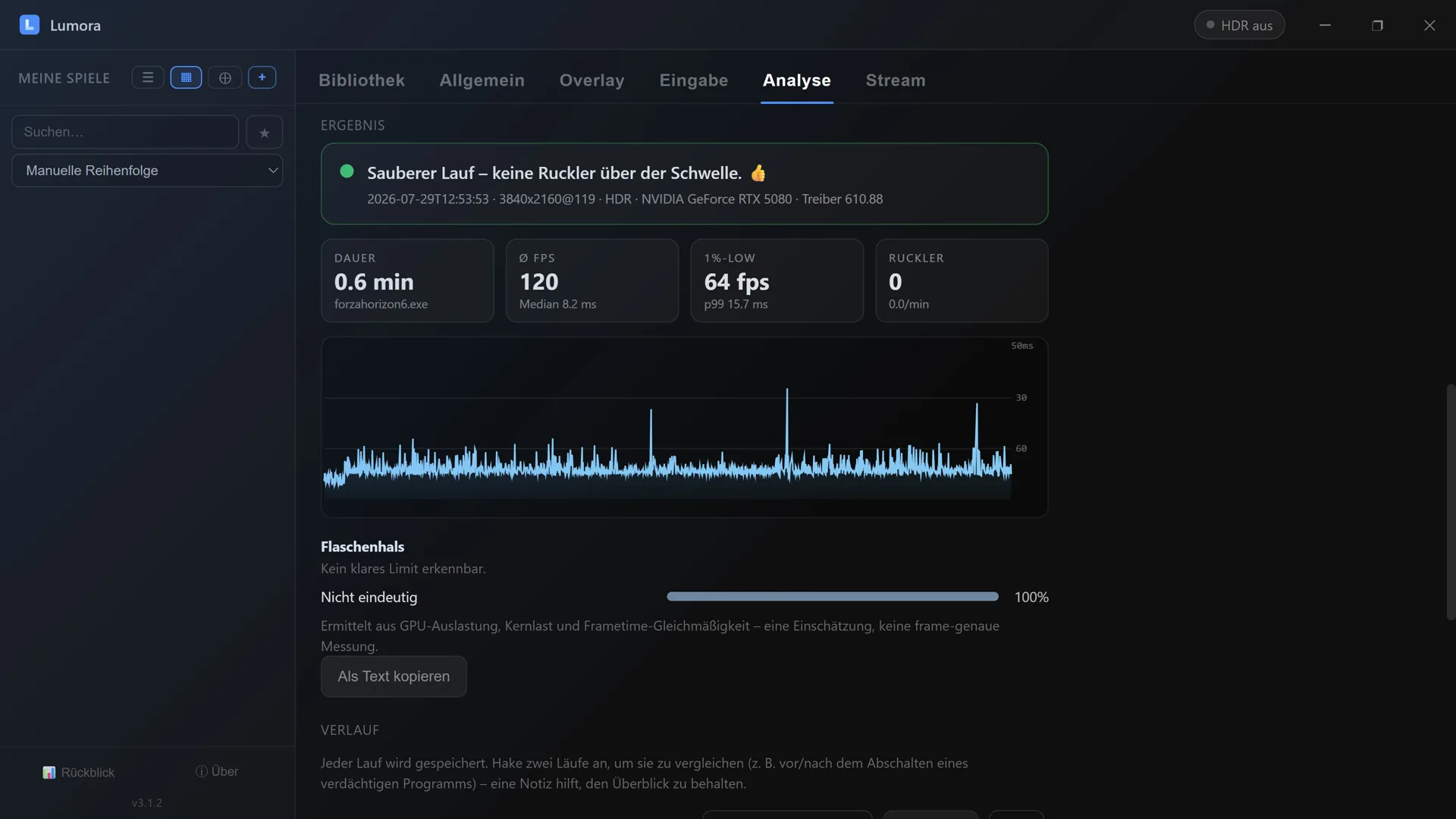
The report after a measurement: plain-language verdict, key figures, frame time graph and bottleneck assessment.
How an analysis works
- 1. Start the measurement – via hotkey mid-game or with one click in Lumora.
- 2. Keep playing normally – a measurement overlay shows the live frame time trace, the stutter count and the first suspect the moment one is caught.
- 3. Stop the measurement – the report appears as a plain-language verdict with a curve, key figures and a list of suspects.
What you get in the end
Not a graveyard of numbers, but a sentence you can act on – for example:
That last result counts as a result too: it saves you from hunting for a culprit that doesn't exist outside the game.
What Lumora looks for
- Background programs taking CPU time at the exact moment of the stutter – antivirus scans, update services, overlay and RGB software, cloud sync.
- Device drivers with latency spikes (DPC/ISR) – by file name, for example graphics, Wi-Fi or audio drivers. This is the discipline that normally requires specialist tools.
- Graphics card throttling – clock drops caused by power or temperature limits, including the reported reason (on NVIDIA cards).
- Video memory filling up – when textures spill into the slower system RAM.
- Bottleneck badge – whether the GPU, a single CPU core, or an FPS cap/VSync is currently setting the pace, shown live in the overlay and as a breakdown in the report.
- Storage access – load bursts and long response times.
- Freshly started programs – the classic nobody remembers afterwards.
Compare before and after
The real value shows on the second run: disable a suspect, measure again, put both runs side by side. Lumora stores every run with game, resolution, refresh rate and driver version, and works out the difference – "Run B: 80 % fewer stutters than run A". You can add a note to each run so that even days later it's clear what changed between measurements.
Being honest: what the analysis can and cannot do
Lumora delivers well-founded suspicions, not proof. A program being conspicuous during a stutter makes it a plausible culprit – which is why we count how often it happened: a hit in 8 out of 10 stutters is a pattern, one in 10 is coincidence. That number deliberately appears in every report.
Equally honest: causes inside the game – shader compilation, streaming of world data – cannot be traced to a line of code from the outside. Lumora does recognise them as such and says so clearly, instead of blaming an innocent process.
Costs practically no performance
Measurement runs through the event tracing built into Windows – the same foundation professional analysis tools use. Reading it happens at low priority and is designed to stay below one percent CPU load; a built-in watchdog automatically drops the most expensive stage should it ever exceed that. With no measurement running there is no load at all. No additional drivers are installed.
How sensitive should it be?
Not every small bump is a stutter. In the settings you pick one of three levels: Sensitive also reports small jumps, Normal sticks to noticeable hitches, Hard stutters only to clear freezes. So you can either catch every irregularity or target exactly the moments you actually felt while playing.
Frequently asked questions
Why does my game stutter even though my hardware is fast enough?
Micro-stutter rarely comes from a lack of raw performance. Typical causes are background tasks briefly grabbing the CPU, drivers with high DPC latency, momentary GPU throttling, or the game streaming in new data. Task Manager usually shows nothing, because these hitches last only milliseconds.
Does Lumora detect a CPU or GPU bottleneck?
Yes: a badge in the measurement overlay and a breakdown in the report show what's currently setting the pace – a GPU limit, a CPU limit, a single-core limit, an FPS cap/VSync, GPU throttling (clock drops from power or temperature limits, with the reported reason on NVIDIA) or VRAM filling up. This is worked out once a second from GPU utilisation, per-core load and how consistent the frame times are – an assessment, not a frame-exact measurement. If the picture stays unclear, it honestly says "inconclusive" instead of guessing.
What are DPC latencies and why do they cause stutter?
DPCs are short tasks that drivers run inside the Windows kernel – for network, audio or graphics. If such a call takes too long, everything else waits, including your game; you feel it as a freeze or micro-stutter. Lumora reads these events and names the responsible driver file, for example nvlddmkm.sys or a Wi-Fi driver. This is exactly what specialist tools like LatencyMon are used for.
Does the measurement itself cost performance?
Not noticeably: the session is designed to stay below one percent CPU load and only runs while you start it. With no measurement running there is no load at all – your FPS stay untouched.
Do I need extra drivers or third-party tools?
No. The analysis uses only built-in Windows facilities. Reading the measurement data requires administrator rights – setup happens once with a single confirmation, after that everything runs without further prompts.
And by the way…
Lumora is first and foremost a game launcher: every game from Steam, Epic, GOG, Xbox, EA & co. in one cover library, automatic per-game HDR, a gaming OSD with FPS and hardware readings and game streaming in up to 4K to your friends' browsers. The stutter analysis is one building block among many – and it doesn't cost you a cent.
More from Lumora
Show FPS & hardware readings in-game →
Share gameplay in 4K with friends →
Drive the whole launcher with a gamepad →