A native launcher for all your games.
With game streaming, automatic HDR and an input bridge.
Lumora unifies Steam, Epic, GOG, Xbox & more in one cover library — at your desk with a mouse, on the couch with a gamepad. Plus streaming a game via a link, automatic HDR per game, a joystick, wheel or flight stick as a virtual Xbox controller, and an FPS/hardware OSD without Afterburner & co. Native C++ code, 3.79 MB, open source.
Lumora is a Windows program
It can’t be installed on a phone. Open this page on your Windows PC — or quickly send it to yourself:
✓ Link copied – now paste it on your PC
🛡️ Windows shows a security warning? Here’s what to do
- Click “More info”.
- Then click “Run anyway”.
— downloads
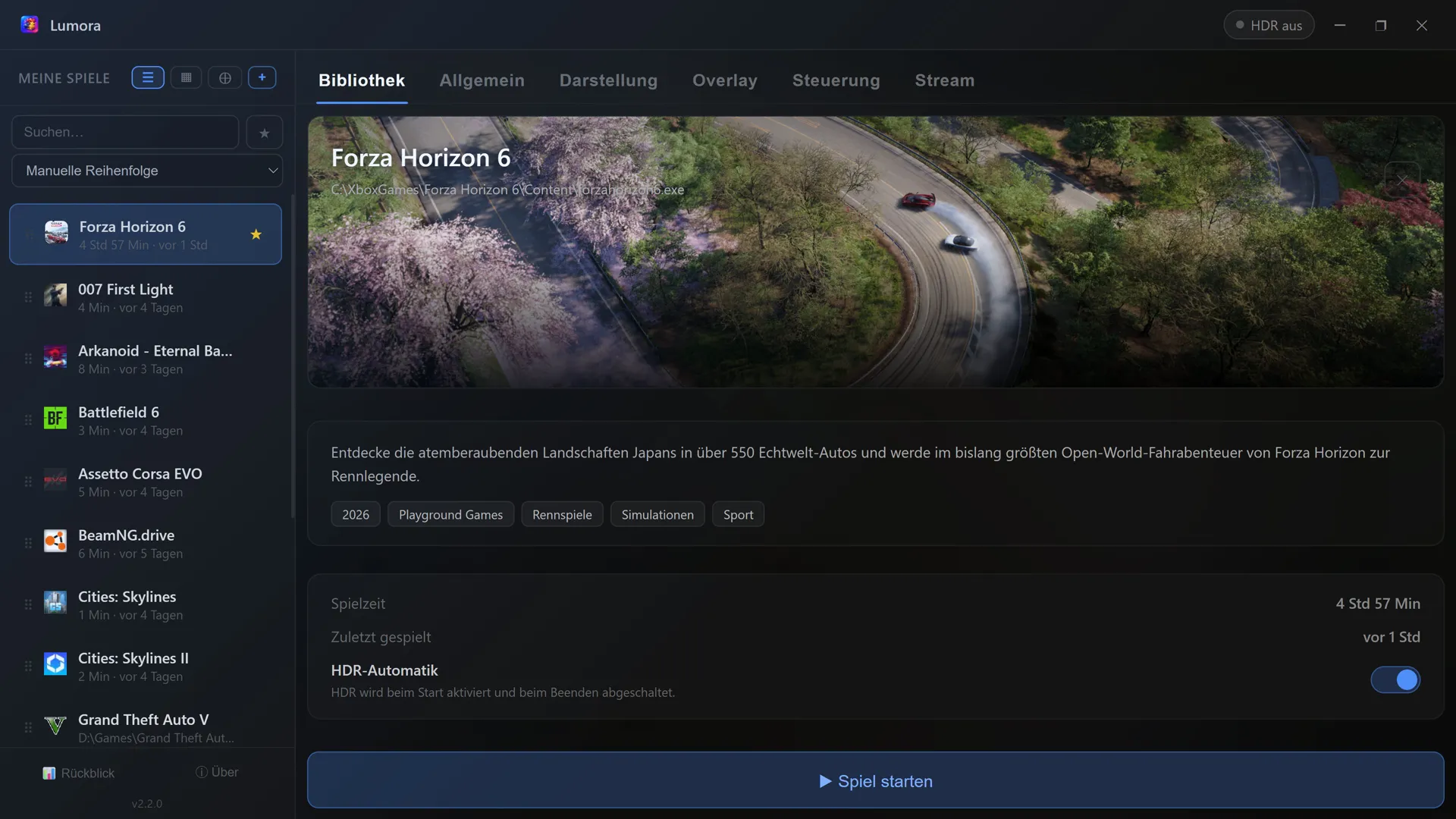
List view – details, description & per-game HDR toggle
Tap to enlarge
How it works
Three steps, done.
Set it up once, then everything runs automatically in the background.
Add a game
Detect them automatically with the scanner, or add them manually via .exe or .lnk. Game covers load automatically.
Launch
Click “Launch game” — Lumora enables HDR and starts the game. A brief moment of preparation, then off you go.
Play & forget
After you quit the game, Lumora turns HDR back off automatically. No manual intervention needed.
Your game. Your stats. Your style.
The performance OSD overlays FPS, GPU and CPU stats on any borderless game — and it does so without MSI Afterburner, without RTSS, without tinkering. Turn it on, play, keep an eye on everything.
FPS & frametime graph
Precise measurement via Intel’s PresentMon technology — for every game, every engine. Already running RTSS? Then Lumora simply uses it automatically.
CPU temperature & power — finally without extra tools
What normally only works with Afterburner & co., Lumora handles via the signed open-source driver PawnIO: one click, one Windows confirmation, done. AMD Ryzen and Intel Core.
GPU stats straight from the driver
Load, temperature, clock, power and VRAM — straight from the NVIDIA (NVML) or AMD driver (ADL). Multiple graphics cards? Lumora picks the fast one automatically, but you can also set it manually.
6 designs, your values
From “Compact” to a horizontal tile strip — plus free choice of which values you want to see. Size, transparency and screen position included.
Live editing — right in the game
The standout feature: reshape the OSD while the game runs. Drag with the mouse, cycle through designs, toggle values on and off — or do it all comfortably with a gamepad from the couch.
Toggled in a flash
Freely bindable hotkey on keyboard and gamepad combo — works mid-game, even in borderless fullscreen.
Setup? One dialog, one Windows confirmation — Lumora handles the rest and transparently shows you every step. In the settings you can always see which source each value comes from.
Show FPS, GPU & CPU stats in-game – how the gaming OSD works →
Features
Everything you need, built in.
No bloat, no cloud, no accounts.
All stores, one scanner
Automatically detects games from Steam, Epic, GOG, Ubisoft, Xbox Game Pass, EA, Battle.net, Rockstar, Amazon and Riot. You can add your own folders too.
Cover library
Switchable grid and list view with beautiful cover art. Launch straight from the grid via ▶.
Playtime, last played & recap
Tracks your playtime across all stores in one place. The playtime recap neatly summarizes total time, top games and favorite genre.
Performance OSD in-game
FPS, frametime graph, GPU and CPU stats over any borderless game — without Afterburner or RTSS, adjustable live in-game. All the details ↑
Share your game live via link
Stream your game with sound via a link – smooth Full HD (1080p60), up to 4K if you like. Viewers just open the link in their browser, no install at all. The connection sets itself up automatically. More on streaming → · Discord streaming without Nitro? The quality comparison →
Favorites, search & sorting
Mark favorites, search instantly and sort by name, playtime or last played.
Gamepad control
The entire interface can be operated with an Xbox controller – living-room-ready on the TV. D-pad/stick navigate, A selects and launches, B goes back. As you browse, the game is shown right away. Control the whole launcher with a gamepad (couch gaming) →
Input bridge: joystick & wheel for any game
Turns a joystick, wheel or flight stick into a virtual Xbox gamepad – for games that only recognise gamepads, including Microsoft Store / Game Pass titles, where nothing else works. Visual mapping, auto-calibration, per-game profiles. Accessible too: button instead of axis and vice versa. How the input bridge works →
Freely bindable hotkey
A global hotkey brings Lumora to the front anywhere or hides it again – either as a key combination or as a gamepad button combo (e.g. the Xbox button).
Automatic updates
Lumora checks for new versions at startup and updates itself on request – no more manual downloads.
Covers & artwork – automatic or hand-picked
Covers, hero banners as well as description, genre and release year load automatically. If something doesn’t fit, you pick from several sources yourself (Steam, Microsoft Store, optionally SteamGridDB) or drop in your own image.
Automatic HDR
HDR turns on when a game starts and back off when it quits — toggleable per game, usable for non-HDR games too.
Launch options
Custom launch arguments per game and “run as administrator” — ideal for mods and special cases.
Customizable & at hand
Selectable accent colors, system tray and autostart with Windows. Dynamic background from the game artwork.
Lean, offline & no account
No cloud, no registration, no background processes after closing. Internet only for loading covers & info.
What’s new
What’s changed.
Lumora is continuously being developed. The most important changes per version:
- Streaming picture back with current NVIDIA drivers – newer drivers deliver AV1 frames in a different layout, which the transport to the browser previously split in a way that let player and preview receive data without ever assembling a frame. Every frame is now packed the way browsers expect – the picture is back, for AV1 as well as H.264 and regardless of the driver version.
- Afterburner OSD via gamepad – the MSI Afterburner OSD can now also be toggled with a controller combination (Settings → Overlay).
- Pause hotkeys for specific programs – programs that need the same key combinations themselves (such as Virtual Pinball) can be listed in the settings; while they are in the foreground, Lumora’s keyboard and gamepad hotkeys stay silent.
- On notebooks with hybrid graphics, the overlay holds the graphics card values through short sensor dropouts instead of flickering and changing the card’s name every second.
- Settings respond instantly on every machine – when opening the settings, Lumora asked Windows about its scheduled tasks in a blocking way. On machines where this query is slow (typically right after a fresh installation), the app then stopped responding to clicks for several seconds. The query now runs entirely in the background and its result is cached.
- The stutter evaluation opens straight away – and explains itself: Clicking a measurement run opens the full evaluation immediately, maximised and in the familiar Lumora window frame. On first opening, a short introduction explains what the frame time curve and the tracks below it mean, and how to track down the cause of a stutter. Every finding is also stated as a full sentence – "Driver X blocked the processor unusually long at exactly this moment" – with the measurements kept below as evidence. The overview of earlier runs shows the matching verdict colour for each run, and the bottleneck appears as its own figure in the header.
- Your window size is reliably preserved: The state is now saved on every change instead of only when closing, and starting into the notification area no longer overwrites the remembered full-screen view. After switching off your PC, Lumora comes back exactly as you left it.
- The preview in the stream area pauses while a game is running – nobody is watching it there anyway, and it costs performance for nothing.
- Analysis workbench: follow a stutter in detail – every measurement run can now be opened as a zoomable timeline. Frame times, suspicious programs, driver latencies and the state of your graphics card are stacked there and scroll in sync. Clicking a stutter opens the evidence panel with exactly the measurements the verdict came from. Two runs can be overlaid directly – for example before and after disabling a suspicious program.
- Per-game network statistic (optional) – Lumora counts the data transferred by the game process including its child processes and shows it in your library at the respective game, and if you want as its own group in the overlay. The counters can be deleted individually or all at once at any time.
- Arrange overlay values by drag and drop – the order of the displayed values is now yours to choose; grab whole groups by the handle. The value board in the settings and in the live editor was redesigned for it.
- Maximised, the taskbar no longer cuts anything off the window, and your library and settings scroll all the way down again.
- Gamepad: A launches games again – even when the A button is part of a gamepad hotkey you assigned yourself (e.g. "A + LB" for the overlay). In that case the button was accidentally blocked from launching games; it now launches normally again, while the combination still triggers only the hotkey.
- Clean upgrade from the previous version – if you came from the older Lumora version, the taskbar briefly showed a wrong name without an icon. Setup now clears the old remnant, so Lumora appears with the correct name and icon again.
- Your library and settings load more robustly at startup.
- More robust under the hood: Lumora now registers with Windows under a fixed app identity, giving it clean grouping in the taskbar and for notifications. If the display component crashes (for example after a graphics-driver reset while gaming), Lumora reloads the interface automatically instead of staying stuck as a blank window. And the installer checks whether the required Microsoft runtime is present and installs it if needed – so Lumora starts reliably even on freshly set-up systems.
- Xbox and Microsoft Store games finally show their icon – for those titles the icon is not stored in the executable but sits as an image in the game folder. Lumora found nothing there and left the tile blank; it now uses the game's package logo. Entries you already have fetch their icon automatically the next time you select them, and a custom image you set yourself is kept.
- Important fix: settings and your library are kept – on machines where Lumora had been freshly installed, the app could not create its data folder. As a result, settings were lost on exit, the game scan reappeared on every start, and playtimes and cover art were not kept either. Lumora now creates the folder itself if it is missing.
- If you still have data from a very old version, from before the rename to Lumora, your library is migrated automatically on first start.
- Launched games reliably come to the front: If you had brought Lumora to the foreground from another application via hotkey and then started a game, the game could end up sitting behind Lumora – you had to alt-tab to it. This comes down to a Windows safeguard: only the application that currently holds the foreground may hand it over. When a game is launched through Steam or a shortcut, that application is not Lumora. Lumora now passes the right along before launching and additionally brings the game window to the front itself once it appears. If you deliberately switched to something else in the meantime, that is left alone.
- Toggle HDR straight from the title bar: The HDR indicator in the top right is now a button – one click turns HDR on or off for your display, without the detour through Windows settings. Automatic switching when a game starts is unaffected.
- Reset playtime yourself: In the playtime recap you can now reset the recorded time – for a single game or for your whole library. You are asked to confirm first, and the confirmation states how much time will be lost.
- Stutter comparison now works with a gamepad: Selecting two measurement runs for comparison previously required a mouse – now you can reach it with the controller too. Stutter analysis is fully usable from the couch.
- Noticeably more robust on tightly locked-down systems: A large overhaul of the foundations. Settings and your library are now written so that an interrupted save can no longer damage existing data. Background checks can no longer hang indefinitely – on machines with a strict antivirus that could stop the overlay setup helper from appearing and make the interface sluggish.
- Streaming and input bridge are steadier: A single dropped viewer can no longer block the connection for everyone else. Unplugging a wheel or gamepad no longer leaves the input bridge stuck on the last value. And if Lumora ends unexpectedly, streaming helper processes are reliably shut down with it instead of lingering in the background.
- Stutter reports now record whether system events had to be dropped during the measurement – making it easy to see how solid the result is.
- A maximized window reliably comes back maximized – now also when Lumora starts minimized with Windows. In that case Lumora first shows only its tray icon; when you later open the window from there or via the hotkey, it reappears in the view you last used. If you deliberately un-maximize it, that is kept.
- Preview while configuring the overlay: when you change size, opacity, position, design or the displayed values, Lumora briefly shows the gaming OSD – even while it is switched off. You see the effect of your change straight away instead of guessing.
- Restarting after an update works reliably: after "Restart now" Lumora shut down but did not come back – the new version did launch, but exited again immediately because the old one was still shutting down. It now waits properly.
- Window size is remembered: if you had Lumora maximized and then minimized it, it comes back maximized after a Windows restart – previously it started as a small window.
- The position picker in the Analysis tab now matches the one in the Overlay tab: the four corners sit where they actually are on screen.
- New: Stutter/Lag analysis – finds the cause of micro-stutter. Start a measurement via hotkey, play for a few minutes, stop it: for every stutter, Lumora names the likely culprit (a background program, driver latency, GPU throttling, VRAM, storage, or a freshly started program), with its own measurement overlay, a plain-language report, history and a side-by-side comparison of two runs. Learn more →
- New: Bottleneck detection – shows live during the measurement what's currently setting the pace: a GPU limit, CPU limit, single-core limit, an FPS cap, GPU throttling, or VRAM filling up.
- Settings tidied up: "Appearance" and "Controls" are now sections inside the "General" tab.
- Gaming OSD now fades in and out smoothly when toggled via hotkey – it used to appear/disappear abruptly.
- Settings stay put: content could shift sideways after bringing the window to the foreground via hotkey, hiding the tab bar – fixed.
- Xbox controller: reconnecting is now stable: turn the controller (Xbox Wireless Dongle) off and back on while Lumora is running and the connection now stays reliable – the interface's controller navigation runs fully natively for that.
- Desktop stays fully clickable: an invisible display layer of the gaming OSD could swallow clicks on desktop icons – that layer is now fully click-through, whether the OSD is shown or hidden.
- Game end detected in seconds: HDR switches back within 1–3 seconds after closing a game (previously up to 12) – Lumora reacts directly to the process exit instead of a polling grid.
- Double-launch guard: while a game is running or starting, no second game can be launched – including a second instance of the same game.
- Live session time on the launch button: while a game is running, "Game running" counts the session time live ("· 12 min").
- More reliable on older Intel graphics: live bitrate changes while streaming now also apply on generations like the HD 630; "Check for updates" also works reliably again.
- Reliable update notices: the silent component update now announces itself even when Lumora autostarts minimized in the background – via a tray notification, and if that is missed, automatically the next time the window is opened.
- Friendlier for testing: if an older version is installed over a newer one, Lumora detects this and correctly offers updates again.
- OSD editor rebuilt: the gaming OSD's live editor has been rebuilt from the ground up – grabbing, dragging to any corner, resizing via mouse wheel and all controls now respond reliably, including on displays with Windows scaling (4K/HDR).
- Edit with see-through: the editor shows your screen semi-transparently in the background and the OSD with real live values – while arranging it you see exactly how it will look.
- New toolbar with clear sections for design, opacity and position; the value toggles glow in the OSD's colors (GPU/CPU/FPS).
- "Bar" is now the OSD's default design.
- Gamepad menu navigation: use the LB/RB shoulder buttons to move through the tabs (Library, General, Appearance …) – driving the whole interface from the couch is even smoother.
- Rock-solid hotkeys: the window and the gaming OSD toggle reliably via keyboard or gamepad hotkey, even in quick succession.
- Operable the moment it's in front: bring Lumora forward with a hotkey and keyboard and gamepad respond right away – no need to click into the window with the mouse first.
- OSD reacts instantly to input and fades out more smoothly.
- Update notice in the background: if Lumora autostarts minimized, a pending update announces itself via the tray icon – one click shows the dialog.
- The OSD no longer blocks the desktop: the gaming overlay used to be a full-screen window and could, on some systems, make desktop icons unclickable (even after turning the OSD off). The overlay is now only as large as the readout itself – the rest of the desktop always stays usable.
- Minor fix when leaving the OSD edit mode; the bundled helper programs now carry the Lumora icon.
- Completely rebuilt – native instead of Electron: Lumora now runs entirely on its own C++ code instead of the Electron framework and external tools. The download shrinks from around 171 MB to about 3.5 MB, with the same feature set, a noticeably faster start and lower memory use.
- More stable streaming: the stutter for remote viewers is fixed – the video data is cleanly capped at the source and lost packets are re-requested automatically. Even with multiple viewers the stream runs noticeably smoother.
- AV1 only where it truly runs smoothly: the stream is sent in AV1 only to devices with a matching hardware decoder – weaker machines automatically get H.264 and thus a smooth picture instead of stutter.
- Calmer quality adjustment: a viewer's brief reception hiccup no longer makes Lumora over-throttle or oscillate; the configured bitrate is respected reliably.
- Demand-driven encoding: AV1 and H.264 are only produced in parallel when both kinds of viewers are actually present – no needless double encode that burdens weak hardware.
- New: input bridge – turns a joystick, wheel or flight stick into a virtual Xbox gamepad, for games that only recognise gamepads (including Microsoft Store / Game Pass titles). With visual mapping right on the pictured controller, a live view of your inputs, auto-calibration, axis↔trigger and button↔axis (combined pedals too), separate devices (wheel + separate pedals) and per-game profiles. Accessible too. Learn more →
- Automatic per-game HDR and the gaming OSD (FPS, GPU/CPU stats) now run on our own code – without extra tools like HDRTray or PresentMon, with a more accurate FPS readout.
- Access control for your stream: when enabled, only people you explicitly approve can watch – each request appears as a small window over the game, with a regulars and a block list.
- Own component updater: updates now swap only the changed parts and offer a restart when needed – fast and reliable, without the full installer.
- Tidied-up interface: consistent, design-matched dialogs throughout, rounded window corners, and the app is fully translated into German and English.
- Signed & trusted: all program files and the installer are digitally signed (Certum) – Windows shows the verified publisher.
- Signed & trusted: Lumora is now digitally signed (Certum Code Signing). Windows shows the verified publisher instead of “Unknown publisher”, and the hard Smart App Control block is gone. Any initial SmartScreen notice fades as the signature builds reputation.
- Own address lumora-streaming.de: Lumora has moved – the website, the update feature and shared stream links now run on its own domain. Links you already shared keep working.
- Safer in groups: when you join a group from the grid, Lumora now asks first what to share (source, resolution, frame rate, bitrate) – your screen no longer goes live unannounced.
- More overview while streaming: the stop button shows the elapsed time, a small summary appears after you finish (duration, viewers, data transferred), and the share link is copied to your clipboard automatically on start.
- Covers for every game edition: titles with “Standard/Deluxe/… Edition” in their name reliably get their cover again – especially games from the Microsoft Store.
- Polish: “Invite friends” is more prominent; the join dialog shows windows with their app icons and keeps the list up to date automatically.
- Lumora is now open source: the complete source code is publicly available at github.com/kara2010/lumora (license: GNU AGPL v3) – anyone can verify what the app does.
- Effortless groups: on a running stream, “Invite friends” creates the group and copies the invite link – anyone opening it joins with a single click (“Join with Lumora”). Your own PCs on the same network even detect a running group by themselves and offer to join. No more typing codes.
- Share a web address instead of an IP: the stream link is now a short URL – it finally works on iPhone too, keeps your IP address out of the viewers' address bar, and even survives an IP change.
- Grid player overhauled: much faster connection setup, picture-in-picture (a single tile or the whole grid as a floating mini window above your game), spotlight view, volume slider, remembered sound selection, phone display stays awake, sleeker design, controls fade out when idle – in German and English.
- Bitrate stays stable: browser stutters on a viewer's side no longer falsely throttle the stream quality for everyone.
- Honest cover search: without a proper match, no random third-party artwork appears anymore.
- Polish: window buttons clickable all the way into the screen corner · quality switching during a stream even more reliable.
- Interface responsive immediately: on startup the hardware detection briefly blocked the UI – tabs were only clickable after a moment. It now runs in the background, so the interface reacts instantly.
- Adjustable HDR streams: if an HDR game looks too dark or lacks detail in the stream, you can now tune it in the stream tab under “HDR fine-tuning” – several image curves and a brightness slider, switchable live in the running stream.
- The stream preview reliably scrolls into view again when you go live.
- Switch quality live – without interruption: Changing bitrate or resolution during a running stream now continues practically seamlessly. Viewers stay connected and only see a brief hiccup instead of a multi-second reconnect.
- Smoother streaming, noticeably less load: Frame processing now runs entirely on the GPU – a real relief especially on laptops and weaker systems (about 62 % less internal data load, no more CPU colour conversion).
- Active help for router port forwarding: If automatic port forwarding (UPnP) fails at stream start, Lumora now shows a notification – one click opens step-by-step instructions tailored to your router.
- A more prominent “Start stream” button and an instantly populated source field in the stream tab.
- Screen streaming fixed – a silent system (no sound playing) used to block the start; now the stream runs immediately, whether audio is playing or not.
- Calmer, faster hardware readout – CPU usage is smoothed (no more jitter, just like Task Manager), while temperature and power respond more fluidly.
- Lumora fully in English – even the last dynamically-set texts (OSD values, colors, buttons) now appear in English in English mode.
- Lean updates fixed – new versions now download reliably as a small package; the update no longer gets stuck and reports errors clearly instead of hanging.
- Lumora fully in English – the last remaining German texts (About/Transparency dialog, SteamGridDB guide, FritzBox port-forwarding help, OSD explanations) now appear entirely in English in English mode.
- Lumora now in English – the entire interface in English and German, switchable in the settings and selectable right during installation.
- 4K streaming over mobile data tamed: on weak reception Lumora now lowers the bitrate immediately and far enough (down to 4 Mbit) – a stable picture is there in seconds instead of after several attempts.
- Clean audio on every system: even with 44.1 kHz devices (hi-fi DACs) or surround outputs, the stream audio stays correct and in sync.
- More robust streaming: automatic recovery if the transmission service briefly drops out, a clear message if a port is in use, a sharp picture when the window switches to fullscreen, a color hint for HDR displays.
- Leaner updates: from now on new versions only download the changed parts instead of the whole package – faster and more data-friendly.
- The stream adapts to reception: if a viewer has weak reception (e.g. on mobile data), Lumora lowers the bitrate automatically in steps until the picture runs stable – and raises it again once the connection allows. Can be turned off in the stream settings.
- Stutters and audio dropouts eliminated: two deep-seated bottlenecks in the transmission chain caused periodic dropouts – both tracked down and fixed. 4K at 60 fps now runs smoothly throughout.
- Audio and video permanently in sync: even with audio pauses, window-size changes or hours-long streams, no delay builds up anymore.
- Stream start in about 2 seconds instead of 10 – router queries run in parallel, the public link is ready almost instantly.
- Screen streams go GPU-direct: capture goes into the encoder without a detour via the main processor – less load, more headroom for the game.
- Web player: subtle playback-duration display · controls toggled by tapping · default receive buffer raised to 300 ms (smoother picture on shaky connections).
- New: group streaming with room codes – “Start group” creates a short code (e.g. TG7KP2), friends type it into Lumora and their own stream starts along automatically. Viewers open the group link in a browser and see all streams in a grid – over HTTPS, so it works on iPhone too.
- The group doesn’t depend on anyone: whoever stops their stream stays a member (shown as “paused”); whoever closes Lumora only removes themselves – for everyone else everything keeps running uninterrupted, code and link stay valid.
- Stay independent: the coordination is a small PHP script that ships with the install – put it on your own web space and enter the address in Lumora. Video traffic never goes through a server, everything stays direct.
- Grid: fullscreen for the whole view, double-clicking a tile shows just that person full-screen, an info display (fps/resolution/bitrate) can be toggled per tile.
- Window sharing: audio now comes only from the shared window/game itself, no longer from the whole PC (e.g. no more browser sound in the stream).
- Live preview in the stream tab now shows true colors · right-click paste in all input fields.
- Audio dropouts in the stream fixed: depending on the system, audio capture regularly mixed tiny blocks of silence into the running sound – tracked down in a 6-hour endurance test and removed.
- Live preview in new quality: real video at full sharpness instead of a still-image sequence, starts practically immediately with the stream – and pauses automatically while you play.
- Faster stream start: the router check runs in the background, audio and video are ready immediately; viewers see a picture faster when turning it on.
- Web player: the prompt to enable sound with a tap now reliably appears as a clear button in the middle of the picture.
- Web player stable on phones: if you switch to another app for a few minutes or a message comes in, the picture reliably returns on its own afterwards – even after a longer break.
- Live preview in the stream tab: you see right away what’s being transmitted – resource-friendly in the background.
- Streaming via hotkey: a freely chosen key starts and stops sharing the running game – with an audible confirmation.
- Tidier stream section: clearly organized into capture, stream and connection. New default quality: 1080p, 60 fps, 8 Mbit/s.
- App icons in the window picker – the right source is recognizable at a glance.
- Web player: volume control and a clear prompt to enable sound; on phones the stream keeps running through app switches or incoming messages.
- Better connection help: concrete router tips, IPv6 direct path as an alternative and support for TURN servers.
- Auto-update now runs through without a setup dialog · significantly smaller download.
- Complete window sharing: now really all open windows appear in the picker – including Explorer and Edge, which were sometimes missing before.
- Web player for phones: responsive layout, the video zoomable and pannable via finger gestures/mouse wheel, info display (FPS/resolution) can be pinned via a button.
- Share link: when copying quickly right after start, you now reliably get the public link instead of accidentally the internal address.
- Clear notice if the NVIDIA driver is too old for streaming.
- Streaming on AMD graphics cards: the black picture with AMD encoders is fixed – streaming now works equally on NVIDIA, AMD and Intel.
- Window streaming: if the captured window changes size (e.g. video → fullscreen), the stream keeps running without interruption – with clean borders instead of a cropped picture.
- An old autostart entry from before the rename is removed automatically.
- Streaming fix: if a previously selected window had since been closed, the stream could show no picture despite the “running” indicator. Lumora now falls back to the whole screen automatically; a window that’s no longer available leads to a clear notice instead of an abort.
- Choose the install location: the installer now asks where Lumora should be installed – instead of simply dictating the location.
- More transparency: the “About” dialog and the website now list all open-source components used, including their license – clear and verifiable.
- Stream your game live via link: in up to 4K with sound, either the whole screen or a specific window/game – viewers see everything in the browser, no install at all.
- Full audio: game and system sound are transmitted reliably – even when it goes quiet in between (menu, ads, still image).
- Keep an eye on viewers: see who’s watching and kick uninvited guests with one click. An adjustable buffer keeps the picture smooth even on a shaky connection.
- HDR games are shown naturally in the stream automatically – bright and color-accurate instead of washed out.
- Gaming OSD: FPS with a graph plus GPU and CPU stats (temperature and load) right over the running game — 6 designs, freely selectable values, adjustable size, transparency and position.
- No extra programs: Lumora fetches all values itself — no separate tool needed. Setup is one dialog plus one Windows confirmation. An existing MSI Afterburner/RTSS is used automatically.
- Live editing in-game: move the OSD with the mouse, switch design and values right in the game — fully via gamepad too.
- OSD shortcuts for keyboard and gamepad combos, freely bindable.
- Clearer settings: tidy tabs right in the interface instead of a dialog; a display reveals where each value comes from.
- Multiple graphics cards are detected (with manual selection) · VRAM display now for AMD too · clean uninstall.
- Playtime recap: overview of total playtime, most-played titles, favorite genre and favorites.
- Gamepad in the grid: A launches the selected game directly – with per-game HDR setting.
- Settings are saved more reliably – your inputs and shortcuts stay safely intact.
- “Start minimized” now only applies to automatic start with Windows.
- Full gamepad control of the interface – living-room-ready on the TV, with helpful hints and update info right in the app.
- Freely bindable hotkey as a key or gamepad button combo, brings Lumora to the front anywhere.
- Automatic updates – Lumora checks at startup and updates itself on request.
- New name & fresh design: the HDR tool becomes Lumora.
- Extended cover & banner search from several sources or with your own image.
- Pin favorites at the top, search across all drives, alphabetical pre-sorting.
- More reliable playtime tracking and improvements to game launching across all stores.
Installation
Download & get started.
The installer sets everything up — no manual extraction needed.
Download the Lumora setup file.
Windows SmartScreen notice: Lumora is digitally signed (Certum Code Signing), so Windows shows the verified publisher. For a brand-new release a message may still appear briefly until the signature builds reputation – just click “More info” → “Run anyway” to continue. The complete source code is openly available on GitHub; all components used are documented below under “Transparency”.
Run the installer. Lumora is installed under %LocalAppData%\Programs\lumora and appears in the Start menu.
On first launch the game scanner opens automatically and searches for installed games.
System requirements
Transparency
What is this built with?
Lumora itself is open source: the complete source code is available under the GNU AGPL v3 at github.com/kara2010/lumora — every line is publicly verifiable. Lumora is built entirely from freely available open-source components; here is a complete list of all third-party technologies used.
| Component | Version | Usage | License | Source |
|---|---|---|---|---|
| Electron | 42.3.0 | App framework, bundles Node.js + Chromium | MIT | electronjs.org |
| Node.js | (included in Electron) | File system, process management, IPC | MIT | nodejs.org |
| Chromium | (included in Electron) | Rendering engine for the user interface | BSD/MIT | chromium.org |
| HDRCmd.exe part of HDRTray |
0.5.5 | Command-line tool to turn Windows HDR on/off | GPL v3 | github.com/res2k/HDRTray © 2022–2025 Frank Richter |
| PresentMon | 2.5.1 | Precise FPS/frametime measurement for the OSD (ETW-based, no game injection) | MIT | github.com/GameTechDev/PresentMon © Intel Corporation |
| PawnIO | 2.x | Signed kernel driver for CPU sensors (temperature/power) — not bundled, but installed from the official source on request (signature is verified) and uninstallable via “Apps & Features” | GPL v2 | pawnio.eu © namazso |
| PawnIO-Module AMDFamily17, IntelMSR |
0.2.9 | Official, verified sensor definitions for AMD/Intel CPUs (run sandboxed in the PawnIO driver) | LGPL 2.1 | github.com/namazso/PawnIO.Modules © namazso |
| koffi | 3.1 | Binding to Windows APIs (sensors, gamepad, shared memory) | MIT | koffi.dev © Niels Martignène |
| FFmpeg | Git-Build (LGPL) | Image capture and hardware encoding for streaming | LGPL v3 | ffmpeg.org Build: github.com/BtbN/FFmpeg-Builds (without GPL components) |
| mediamtx | 1.19.2 | WebRTC server — distributes the stream to viewers’ browsers | MIT | github.com/bluenviron/mediamtx |
| Vortice.Windows | 3.6.2 | Direct3D / Windows Graphics Capture in the capture helper | MIT | github.com/amerkoleci/Vortice.Windows |
| NAudio | 2.2.1 | System audio (WASAPI loopback) for the stream sound | MIT | github.com/naudio/NAudio |
| .NET-Runtime | 8.0 | Runtime of the capture helper (lumora-capture.exe) | MIT | dotnet.microsoft.com |
| electron-updater | 6.x | Automatic updates | MIT | electron.build |
| electron-builder | 26.8.1 | Build tool for creating the installer (not included in the app) | MIT | electron.build |
resources/app.asar
and can be viewed in the HDRTray GitHub repository.
resources folder; the sources can be viewed via ffmpeg.org or the respective repositories.