Show FPS & hardware stats in-game – without tool juggling
How many FPS? Is the GPU running hot? Are frametimes causing the stutter? Lumora's gaming OSD overlays exactly the values you care about on top of your game – pretty, configurable and completely free.
⬇ Download Lumora for freeFor Windows 10 & 11 · NVIDIA, AMD & Intel · open source
What the OSD can do
- FPS & frametime graph – measured precisely via Intel's PresentMon, not estimated.
- GPU: load, temperature, clock, power draw, VRAM – NVIDIA, AMD and Intel, including multi-GPU systems (display GPU selectable).
- CPU: load, temperature, clock, power draw, RAM – sensors run through the signed open-source driver PawnIO (the same foundation as LibreHardwareMonitor and FanControl), set up with a single click.
- 6 designs, from subtle to detailed – plus a free choice of which values appear per category.
- Live editing in-game: change position, design and transparency right on top of your running game – with mouse or gamepad, no alt-tabbing.
- Hotkey or gamepad combo to toggle – freely bindable, works mid-game.
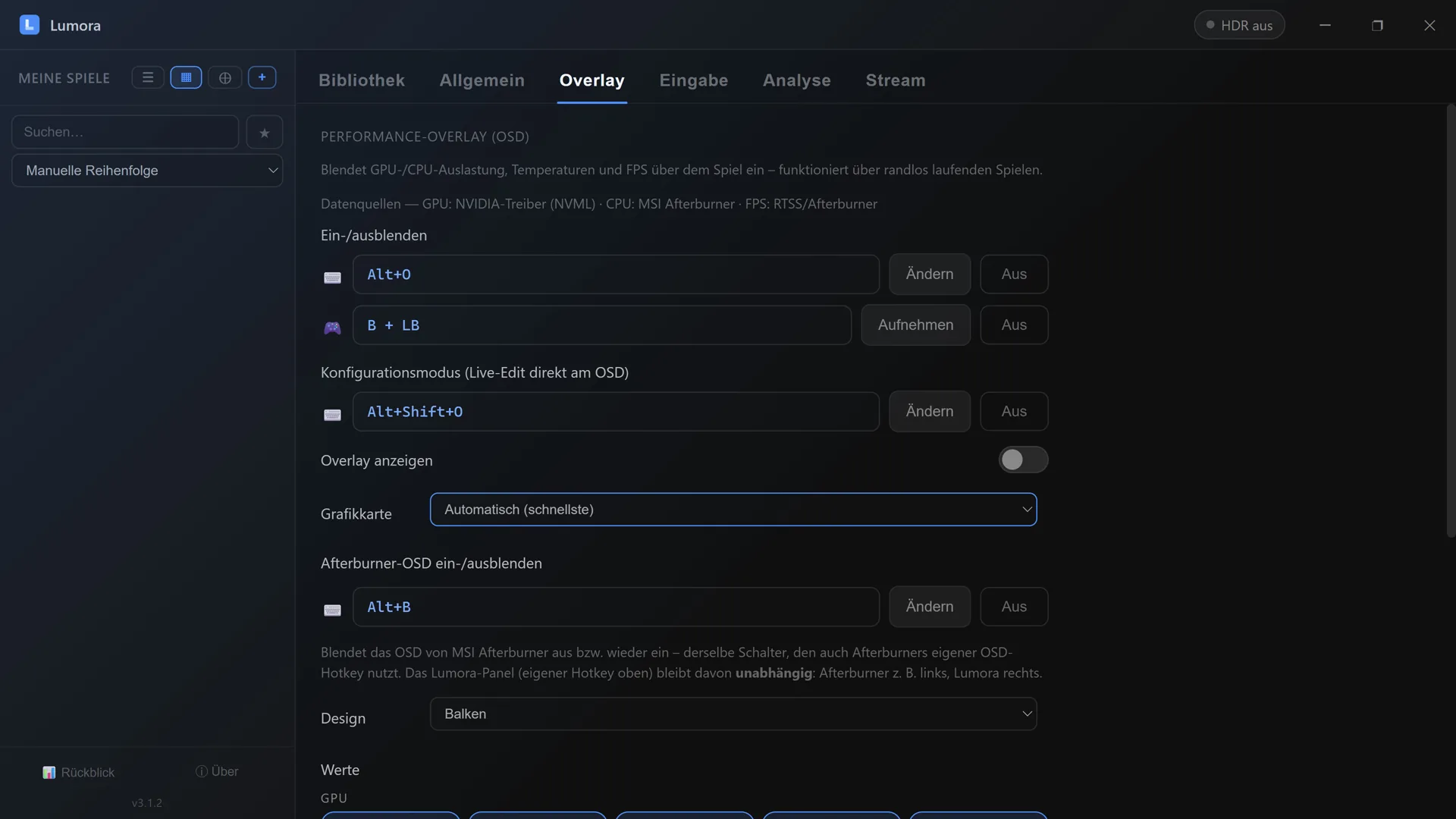
Everything in one place: hotkeys (keyboard and gamepad), design, size, opacity, position and which values are shown.
Why no extra tool is needed
Getting an FPS display plus hardware monitoring used to mean combining several programs with separate configuration. Lumora ships the whole chain – measurement, display, controls – built into the launcher you use to start your games anyway. Already using Afterburner & co.? Both coexist peacefully.
And by the way…
Lumora is first and foremost a game launcher: all your games from Steam, Epic, GOG, Xbox, EA & more in one cover library, per-game automatic HDR, playtime tracking – and 4K game streaming to your friends' browsers. The OSD is one of many building blocks.
Frequently asked questions
How do I show my FPS in-game?
Install Lumora, enable the OSD, start your game – the FPS display (optionally with frametime graph, GPU and CPU stats) sits on top of your game. Toggle it with a freely bindable hotkey or gamepad button combo, even mid-game.
Which values can the OSD show?
FPS and a frametime graph, GPU load, temperature, clock, power draw and VRAM, plus CPU load, temperature, clock, power draw and RAM. You choose per category which values are visible.
Do I need MSI Afterburner or RTSS for this?
No. Lumora ships the complete measurement chain itself: FPS via Intel's PresentMon, CPU sensors via the signed open-source driver PawnIO – the same foundation used by well-known tools like LibreHardwareMonitor and FanControl. If you already use Afterburner, both run side by side just fine.
Does the OSD work in fullscreen?
The OSD overlays borderless games (borderless/windowed fullscreen) – the standard mode of most modern games. Position, size, design and transparency are edited live in-game, with mouse or gamepad.
More from Lumora
Stream your game in 4K to friends →
Control the whole launcher with a gamepad →
Streaming quality: Lumora vs. Discord without Nitro →